> ## Documentation Index
> Fetch the complete documentation index at: https://proof-manager-docs.geticonicapps.com/llms.txt
> Use this file to discover all available pages before exploring further.
# Dashboard Overview
> Understand the Order Summary and Orders table
The **Orders** tab is your home base — every synced order and its conversation with the customer lives here.
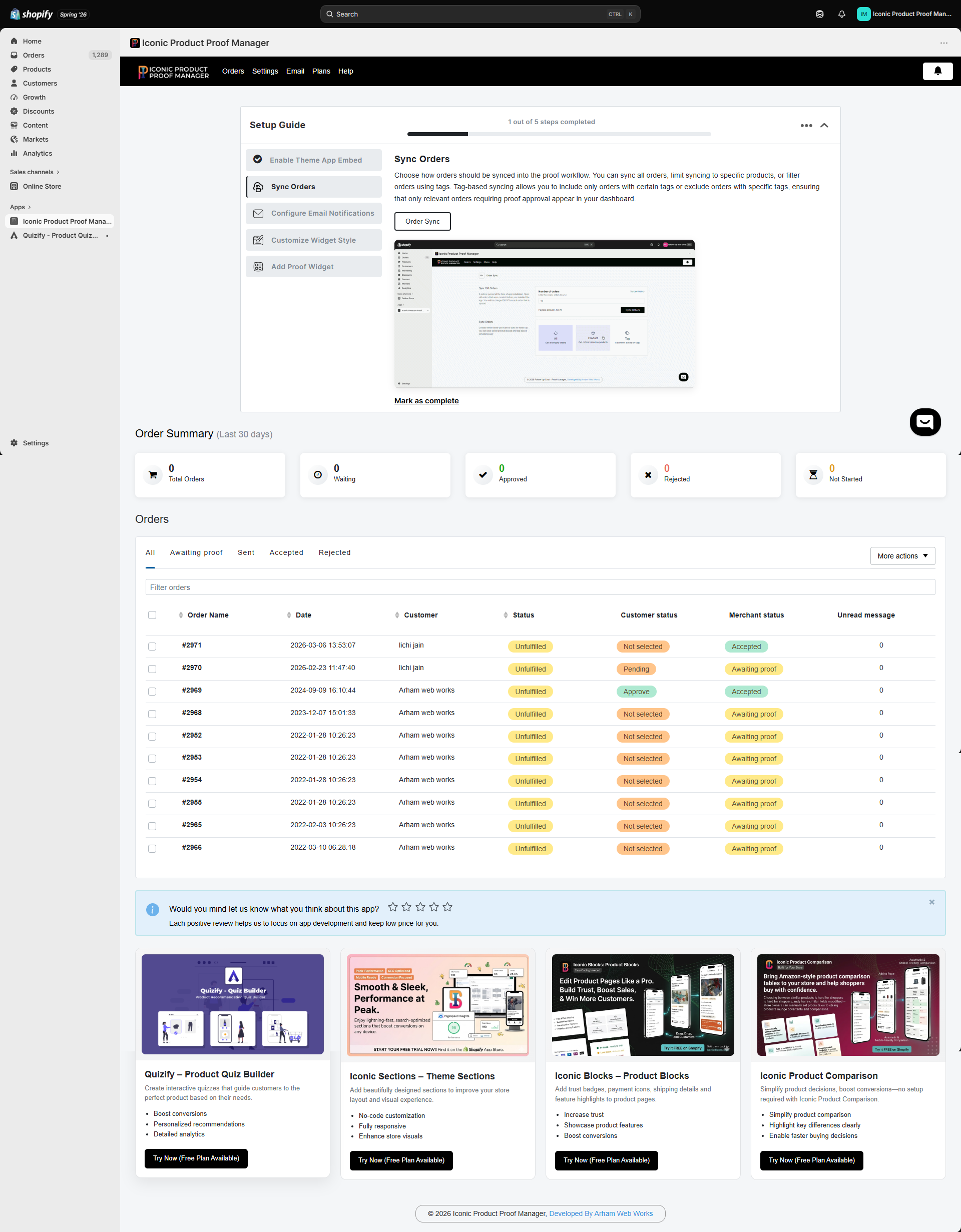 ## Order Summary
A rolling 30-day snapshot of your synced orders, broken down by your **merchant status**:
| Card | Meaning |
| ---------------- | -------------------------------------------------- |
| **Total Orders** | All orders synced in the last 30 days |
| **Waiting** | You haven't reviewed/responded yet |
| **Approved** | You've marked the order as accepted |
| **Rejected** | You've marked the order as rejected |
| **Not Started** | Default status right after sync, before any action |
## The Orders table
Each row is one synced order. Use the tabs (**All**, **Awaiting proof**, **Sent**, **Accepted**, **Rejected**) to filter by status, or type in the **Filter orders** box to search by order name, date, or customer name. Click any column header to sort.
Columns:
* **Order Name** — the Shopify order number
* **Date** — when the order was placed
* **Customer** — customer name
* **Status** — Shopify's fulfillment status (e.g. Unfulfilled)
* **Customer status** — what the *customer* has done: `Not selected`, `Pending`, `Approve`, `Reject`
* **Merchant status** — what *you've* set: `Not Started`, `Awaiting proof`, `Accepted`, `Rejected`
* **Unread message** — count of unread messages from the customer
Select one or more orders with the checkboxes to use **More actions**, such as deleting orders from your dashboard (this only removes them from the app — it does not affect the order in Shopify).
Customer status and merchant status are tracked independently. A customer can approve a proof while you still have the order marked "Awaiting proof" until you update it — see [Managing an Order](/orders/03-managing-an-order).
Click any order row to open its conversation — covered in [Managing an Order](/orders/03-managing-an-order).
## Order Summary
A rolling 30-day snapshot of your synced orders, broken down by your **merchant status**:
| Card | Meaning |
| ---------------- | -------------------------------------------------- |
| **Total Orders** | All orders synced in the last 30 days |
| **Waiting** | You haven't reviewed/responded yet |
| **Approved** | You've marked the order as accepted |
| **Rejected** | You've marked the order as rejected |
| **Not Started** | Default status right after sync, before any action |
## The Orders table
Each row is one synced order. Use the tabs (**All**, **Awaiting proof**, **Sent**, **Accepted**, **Rejected**) to filter by status, or type in the **Filter orders** box to search by order name, date, or customer name. Click any column header to sort.
Columns:
* **Order Name** — the Shopify order number
* **Date** — when the order was placed
* **Customer** — customer name
* **Status** — Shopify's fulfillment status (e.g. Unfulfilled)
* **Customer status** — what the *customer* has done: `Not selected`, `Pending`, `Approve`, `Reject`
* **Merchant status** — what *you've* set: `Not Started`, `Awaiting proof`, `Accepted`, `Rejected`
* **Unread message** — count of unread messages from the customer
Select one or more orders with the checkboxes to use **More actions**, such as deleting orders from your dashboard (this only removes them from the app — it does not affect the order in Shopify).
Customer status and merchant status are tracked independently. A customer can approve a proof while you still have the order marked "Awaiting proof" until you update it — see [Managing an Order](/orders/03-managing-an-order).
Click any order row to open its conversation — covered in [Managing an Order](/orders/03-managing-an-order).